Build a List So Specific It's Basically a To-Do List
A basic Smart List finds a group. Advanced filters find the exact people you should be calling in the next hour.
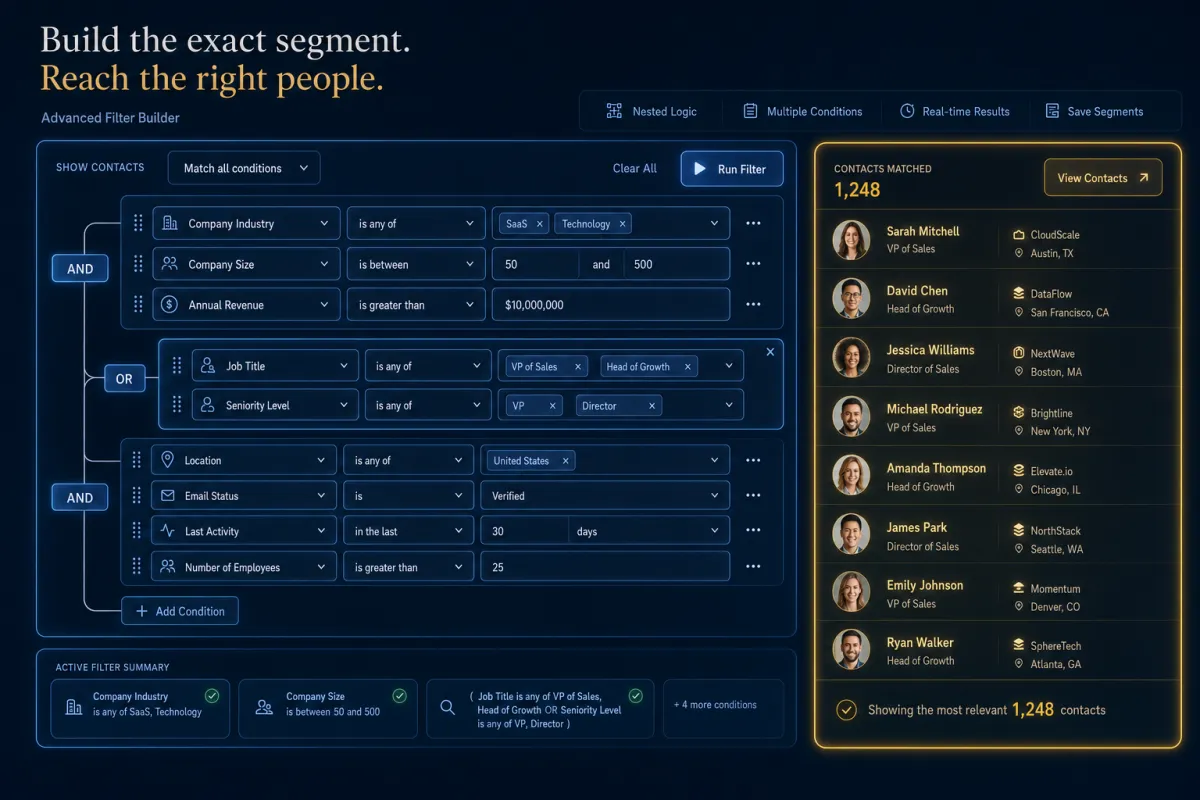
Once you’ve got the hang of Smart Lists, the real power is in how precisely you can slice. A plain filter is a category — “tagged hot lead.” Advanced filters are a scalpel: field, operator, value, stacked with AND/OR and date logic until the list is so specific it reads like a task list.
Every filter is three decisions

The whole system is one pattern repeated: pick a field, pick an operator, set a value. The operators change based on the field. A date field gives you date logic; a number field gives you greater-than and less-than. Choose the field that holds the data, then the operator that matches the question you’re actually asking.
A basic list finds a group. Advanced filters find the exact people to call this hour.
AND narrows, OR widens
This is the part that turns a list into a strategy. Add a nested filter with AND when a contact must match both things — “last activity in the last 7 days” AND “no appointment booked.” Add a separate filter with OR when either condition should pull them in — “tagged hot” OR “engagement score over 90.” Stack them and you describe a very particular person instead of a vague bucket.
The filters that earn their keep
A few that quietly run a business: date filters like “in the last” to catch fresh engagement, or “more than 30 days ago” to surface the people going cold. DND filters to build a clean, compliant call list — pull only contacts whose Calls DND is disabled so you never dial someone who opted out. And “is empty” to find the gaps: leads with no appointment on record, contacts missing a key field.
Find the holes, not just the wins
Advanced filters aren’t only for finding people to sell — they’re for finding what’s broken. “Email status is empty” surfaces contacts you can’t reach. “Engagement score is empty” finds leads who never took your quiz. Cleaning those up is often worth more than another blast, because every dead record is dragging your numbers down.
The takeaway
Open your Smart List, hit Advanced Filters, and build the one list you wish existed: people who engaged recently, haven’t booked, and aren’t on DND for calls. That’s three conditions joined with AND — and it’s your call list for the rest of the day. Build it once, and it refills itself every morning with exactly the right names.
